How AI diagram makers work, and how to judge one before you rely on it
What happens between your description and the finished picture, the two kinds of tool you will meet, and eight questions that separate them.
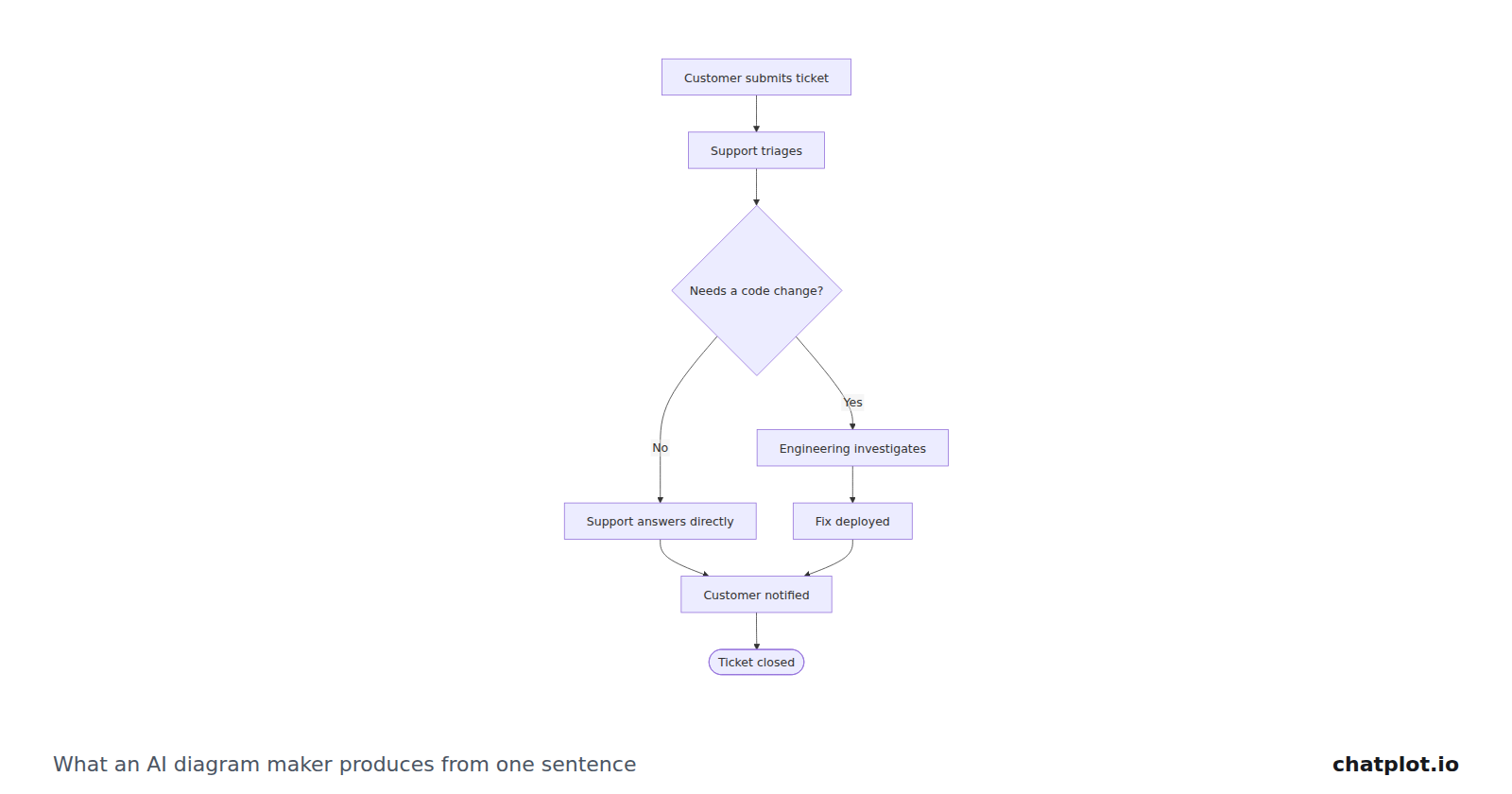
An AI diagram maker turns a description written in ordinary language into a diagram you can keep working on. You write what the process is; the tool decides what is a step, what is a decision, what connects to what, and draws it. The label covers products that behave very differently, so here is what happens in between, and eight questions to ask before you rely on one.
What actually happens between your text and the picture
Your description is read as structure, not as prose. The model decides that "support triages it" is a step, that "anything that needs a code change" is a decision with two outcomes, and that both outcomes reach the same notification step.
That structure is written as diagram code: a short, strict text description of the elements, their labels and the connections between them. That text, not a picture, is the model's output, which is why a diagram can be versioned and edited like any other document.
A layout engine turns the code into a drawing. It places the boxes, routes the arrows and applies a theme. No model places pixels, which is why results are consistent, and why in description-first tools you usually cannot nudge a box.
You get an editable result. A change request goes back through the same loop and returns a new version of the same diagram.
The two kinds you will meet
A drawing canvas with AI added. These products started as places to draw, and generation is one more way to get shapes onto the board. As their official pages described them in September 2026: Miro's pricing page lists AI features that "Generate diagrams, tables, and summaries" and meters AI use as monthly credits per member, with a limited trial on the free plan. Lucid's plan help article lists diagram generation for Lucidchart (generate a diagram or board, iterate on a diagram, an AI diagram outline) on its free and paid plans, without stating credit limits. Whimsical publishes an AI flowchart generator page whose buttons lead to sign-up; its pricing page lists no per-plan AI limits, and puts a watermark on free-plan exports.
Description-first tools. Here the description is the primary thing and the picture is generated from it every time. Eraser's DiagramGPT page generates diagrams from a text prompt, and Eraser's pricing page counts "AI credits (diagrams & outlines)" per plan with a small allowance on the free plan. ChatPlot works this way too.
The difference shows up when the result is wrong: on a canvas you fix it by hand, in a description-first tool you say what is wrong. That is faster for structure and impossible for appearance.
What editing by words looks like
A support process, described in one sentence:
A support ticket process: the customer submits a ticket, support triages it, simple questions are answered directly, anything that needs a code change goes to engineering, and the customer is notified when the ticket is resolved.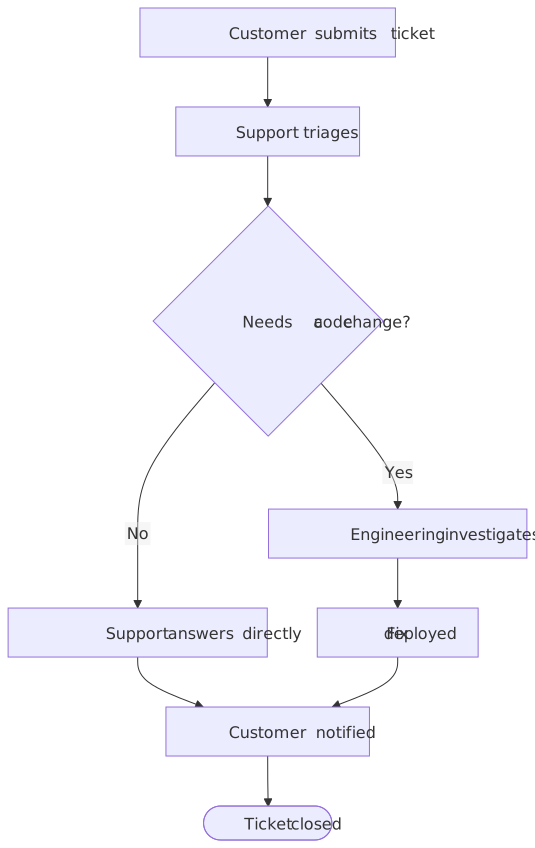
Then a rule nobody mentioned the first time:
Add an SLA rule: if a ticket has been open for more than two days, escalate it to the support lead before it goes back to the customer.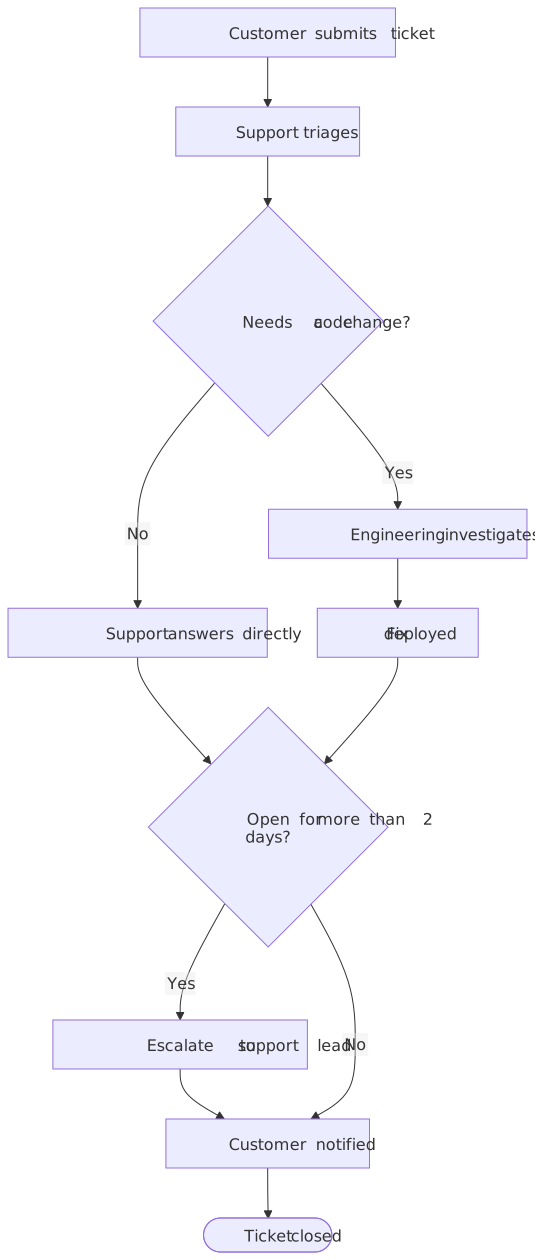
Notice where the new decision went: not onto one branch, but onto both, so every ticket passes the same check before the customer is notified. That interpretation is the part worth judging; the drawing is the easy bit.
How to evaluate one
Can you edit by words, and by hand? Word editing handles structure; hand editing handles the last five percent of appearance. Most tools do one well and the other badly. Decide which you need first.
Are edits versioned? If an edit can quietly destroy work, you will stop editing. Look for history you can compare and restore, not just an undo key.
What does an action cost, and what is free? Ask what counts as a billable action, whether failed generations are charged, and which operations (templates, exports, sharing, theme changes) are free. Tools that meter everything get expensive once you iterate.
What exports exist, and are they watermarked? Check formats, resolution, and whether free-tier exports carry a mark. If the diagram goes into a customer document, this decides the plan you need.
What happens to your data? A description of an internal process is not trivial information. Find out which providers see it and what they do with it; ChatPlot's answer is in its privacy policy.
Can it do the diagram types you need? A tool that is good at flowcharts may not do sequence diagrams, mind maps or ER diagrams. Test with your least common type.
How does it handle ambiguity? Real descriptions are ambiguous. The useful behavior is to make a reasonable choice and say which one it made, so you can correct it; the dangerous behavior is silent guessing.
Can you share without an account? If every reader has to sign up, the diagram gets exported as an image and goes stale. A link that opens for anyone keeps it the source of truth.
Where ChatPlot fits
ChatPlot is description-first. Write or paste what you want and you get a flowchart, sequence diagram, mind map, ER diagram, Gantt chart or one of several other types, then change it by asking. Layout is automatic: you choose direction and theme, but you cannot drag a node.
You can try it without an account: guests get 5 AI actions per session, keep up to 3 diagrams in that browser, and export PNG and SVG with a small chatplot.io mark. A free account, created with Google sign-in, gets 10 AI actions per calendar month and unlimited diagrams synced to the account. Pro is $15 per month or $144 per year for 500 AI actions per month, exports with no mark and PNG at up to 3× resolution. One AI action is one create or edit request that returns a diagram; failed requests are not charged, and templates, history, undo, compare, restore, direction and theme changes, exports and share links never use one.
What ChatPlot does not have today: real-time co-editing, shared team workspaces, PDF export, integrations with other tools, and Team or Enterprise plans. If two people must edit one diagram at once, this is not the tool for it.
Limits of any AI diagram maker
- It draws what you said, not what you meant. Gaps get filled with the most ordinary assumption, and a confident diagram of the wrong process looks exactly like a correct one.
- It does not know your organization. Thresholds, owners, team names and the exception everyone works around have to come from you.
- Automatic layout is a trade. You get consistency and easy restructuring; you give up control of where things sit.
- Large diagrams stop being readable before the tool stops drawing them. Splitting one into a top-level view plus one per phase is still your judgment call.
- Output varies. The same description asked twice can come back with different wording or shape. Treat the first result as a draft to correct.
The way to judge any of this is to run a process you know well through it and count what you have to correct, or start from a template and change it.