AI flowchart generator: describe the process, get the flowchart
Write the process the way you would explain it to a colleague: steps, decisions, what happens on "no". ChatPlot draws the flowchart. Then change it by asking: add a step, add an SLA check, split a phase, flip it left-to-right.
Opening the app spends nothing. Your first 5 AI actions are free as a guest, no account needed.
Published
You wrote
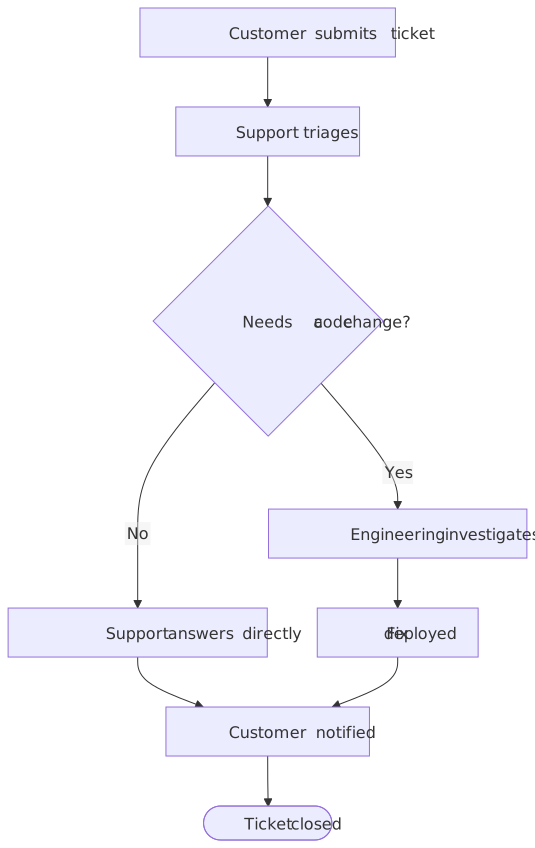
A support ticket process: the customer submits a ticket, support triages it, simple questions are answered directly, anything that needs a code change goes to engineering, and the customer is notified when the ticket is resolved.
Then change it by asking
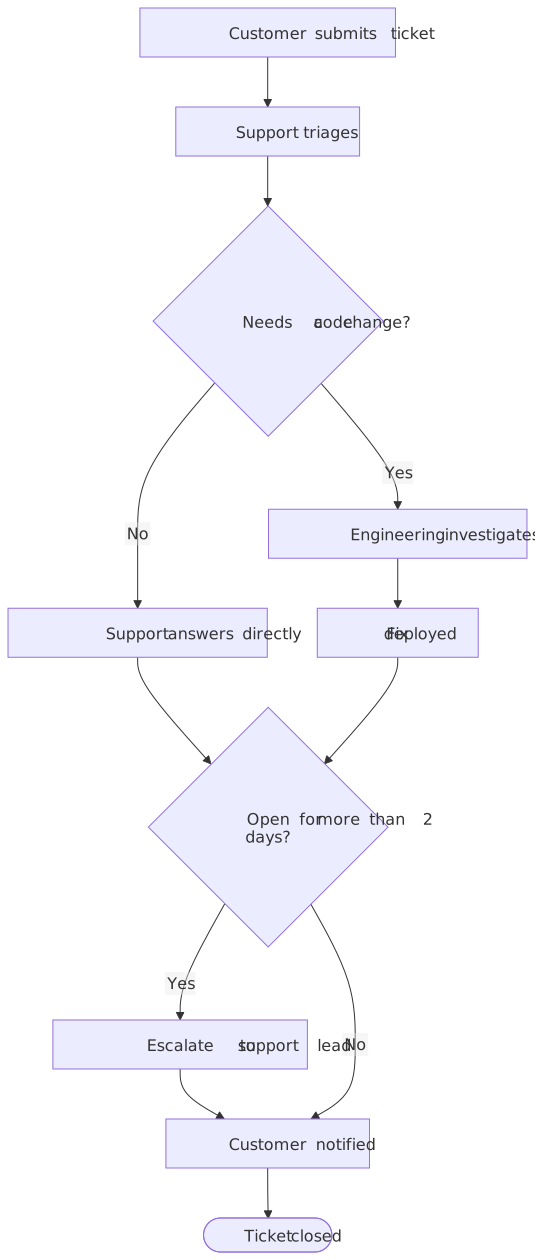
The edit below was made with a single follow-up request. Every accepted change becomes a version you can undo, compare or restore.
Follow-up request
Add an SLA rule: if a ticket has been open for more than two days, escalate it to the support lead before it goes back to the customer.
One AI action. The previous version stays in history, so you can undo, compare or restore it at any time.
What you can ask for
- Add, rename or remove steps ("add a fraud check after payment")
- Add decisions with yes/no branches, or turn a step into a decision
- Add loops and exception paths ("if validation fails twice, escalate")
- Group steps into phases or lanes ("group the first three steps as Intake")
- Change direction (top-to-bottom or left-to-right) without spending an AI action
- Reword labels to match your team's vocabulary
When a flowchart is the right format
- A process with a clear start and end: approvals, onboarding, incident handling, order fulfillment.
- Decisions matter more than timing, and you need to show what happens on each branch.
- The reader should be able to follow one path with a finger.
When it is not
- You need to show who sends what to whom and in which order. That is a sequence diagram.
- You are organizing ideas rather than steps. A mind map keeps the hierarchy without implying order.
- More than roughly 40 steps: split it into a top-level flow plus one flowchart per phase, or the chart stops fitting on a screen.
Limits to know before you start
- Layout is automatic. You choose the direction and the grouping; you cannot drag a box to an exact pixel position.
- Long labels wrap but very long ones get cramped. Keep each step to a short phrase and put detail in the chat instead.
- Guest and Free exports carry a small chatplot.io mark; Pro removes it. There is no PDF export; download PNG or SVG and place it in your document.
- AI edits use actions from your plan; direction, theme and export never do.
Free to try, no account needed
- Guest: 5 AI actions to try it, up to 3 diagrams saved in this browser, PNG and SVG export with a small chatplot.io mark.
- Free account (Google sign-in): 10 AI actions every month, unlimited diagrams synced to your account, exports with the mark.
- Pro: $15 per month or $144 per year, 500 AI actions a month, exports without the mark, PNG up to 3× resolution.
One AI action = one create or edit request that produces a diagram. Failed requests are not charged; templates, history, direction and theme changes, exports and share links never use actions. Team and Enterprise plans are not available. Full pricing.

Questions before you start
Can I paste meeting notes instead of writing a description?
Can I start from a template instead?
What does it cost?
Try it on a process you keep explaining
Paste the description, get the flow chart, then ask for the changes you would ask a colleague for.