ChatPlot vs Lucidchart: a canvas of shapes vs a diagram you describe
Lucidchart gives you documents, shapes and templates to build with. ChatPlot draws the diagram from your description and edits it when you ask.
Lucidchart is a diagramming application in the classic sense: documents on a canvas, a shape library, templates, and plans that run from one person to a company, with AI generation on top.
ChatPlot has no canvas to build on. You write what the diagram should show, it draws one, and every change after that is another sentence.
At a glance
The ChatPlot column comes from ChatPlot's own plan rules. The Lucidchart column comes from Lucid's trial page and the Lucid Plans help article as read on September 11, 2026. Lucid's pricing page renders in the browser and could not be read, so some cells say a fact was not shown.
| ChatPlot | Lucidchart | |
|---|---|---|
| How you make a diagram | Describe it in plain language. Layout is automatic; you pick the direction and theme and ask for changes in words. No manual drag-and-drop positioning. | On a canvas, as documents. Free lists "3 editable Lucidchart documents", "60 shapes per document" and "100 basic templates"; Individual adds "Unlimited documents". |
| Real-time collaboration | Not available: no co-editing, no shared workspaces. A share link carries the diagram inside the link and opens without an account. | The pricing page describes the product as a way to "collaborate in real-time". The help article lists comments and tasks, download and print, revision history with versioning, and inviting others, the last two on Team and above. |
| AI generation | The main way to create and change diagrams (templates and the advanced code editor are the alternatives). 5 actions per guest session, 10 per calendar month on a free account, 500 per month on Pro. | Yes. The help article lists "Generate diagram or board", "Enhance prompt", "Iterate diagram" and "AI diagram outline" on the Free, Individual, Team and Enterprise plans; "Process Capture" is Enterprise only. Per-plan AI limits were not shown. |
| Export formats | PNG and SVG. Diagram code is an advanced opt-in. No PDF. | "Visio import and export" on the Individual plan. Other formats were not shown on the pages that could be read. |
| Free tier | Guest: 5 AI actions per session, up to 3 diagrams kept in the browser. Free account: 10 per calendar month, unlimited diagrams synced. Both export PNG and SVG with a small chatplot.io mark. | A free plan with 3 editable documents, 60 shapes per document and 100 basic templates, plus a "7-day free trial". |
| Paid plans | Pro, $15 per month or $144 per year: 500 AI actions per month, no mark, PNG up to 3x resolution. No Team or Enterprise plan. | Individual at "$9.00/month + tax" with unlimited documents and 1 GB storage. Team and Enterprise prices were not shown on the official page that could be read. |
What the ChatPlot side looks like
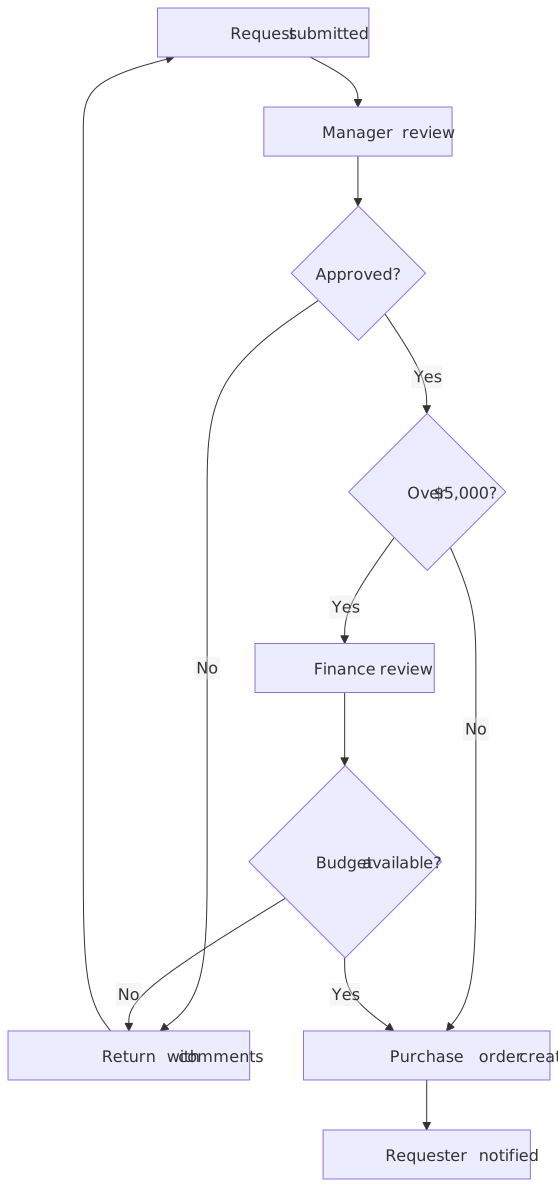
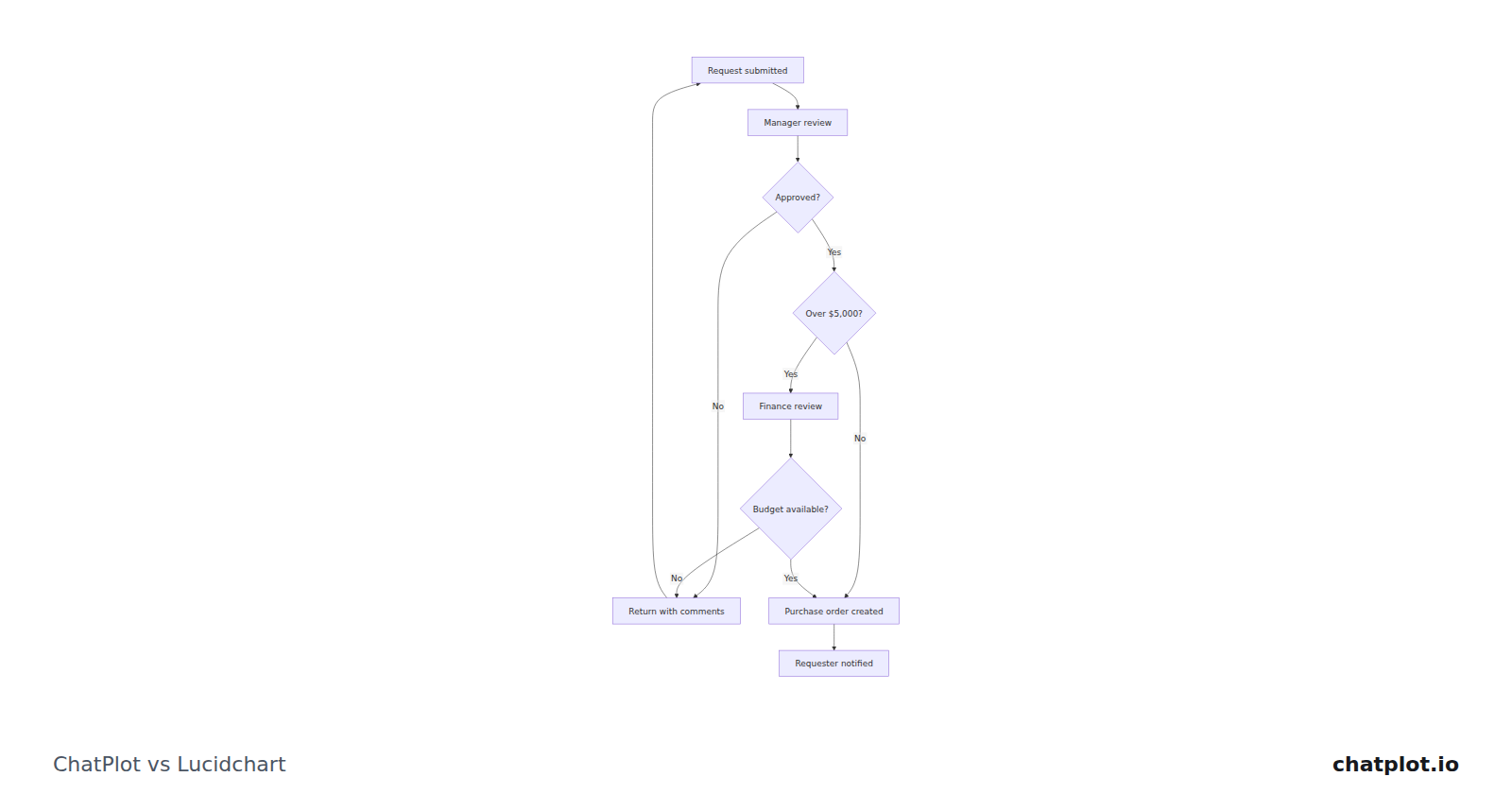
The branch labels, the decision diamonds and the spacing are consequences of one description. That is why an edit like "add a second approval over $25,000" reflows the chart instead of leaving you to reroute arrows.
Where Lucidchart is the better fit
- You need exact control of a document, deciding where each element sits.
- You live in the Visio file world: Individual lists Visio import and export, and ChatPlot reads and writes neither.
- Several people need one document, with comments, tasks and revision history as plan features.
- You are buying beyond one seat. Lucidchart has Team and Enterprise tiers; ChatPlot has neither, no shared workspace and no single sign-on.
Where ChatPlot is the better fit
- The structure is not settled. Eight steps written out can be rewritten; eight placed boxes have to be rearranged.
- You want changes to be sentences: "put finance before the manager", "merge the last two steps".
- You want to hand the result to someone with no account, through a link that carries the diagram.
- One person, one price: $15 per month or $144 per year, no seats to count.
Try the same task in both
Task: the purchase approval process above, including the rejection loop. In ChatPlot, type this:
Draw a purchase approval flowchart. A request is submitted and goes to manager review. If the manager does not approve, return it with comments. If approved and the amount is over $5,000, finance checks whether budget is available, and if there is none, return it with comments. Otherwise create the purchase order and notify the requester.Then make one edit by asking:
Add a department head approval before the purchase order for anything over $25,000, and label the return path "needs changes".That is two AI actions. Failed requests are not charged, and templates, undo, version history, direction and theme changes, exports and share links never use one. The approval process template starts from the same diagram.
Bottom line
Lucidchart is a full diagramming application, with a plan ladder that reaches an organization; if you need that, nothing here argues otherwise. ChatPlot is narrower on purpose: one diagram at a time, made and changed by describing it. Choose Lucidchart when the artifact must be assembled precisely or shared inside a company with seats and admin. Choose ChatPlot when a description is the most honest statement of what you mean.
Sources
Competitor details were read from these pages on September 11, 2026 and may have changed since.