Approval process flowchart template
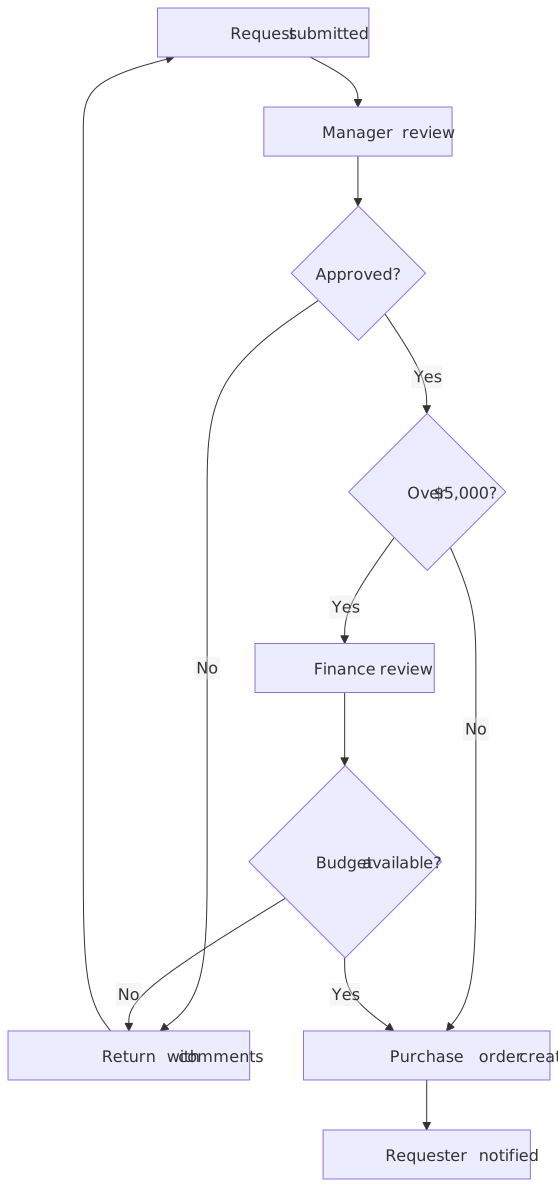
Most approval processes live in people's heads: "ask your manager, and finance if it is big". This template writes the rules down as a flowchart (who reviews, what threshold triggers the finance check, and what happens when a request comes back) so a new colleague can follow it without asking.
Opens instantly as a new diagram in the workspace, without using an AI action and without touching your existing diagrams. No account needed.
Published
What is in the template
- Request submitted → Manager review
- Every request starts with the requester's manager. The first decision is simply "Approved?".
- Return with comments loop
- A "No" at any decision sends the request back to the requester with comments, and the requester can resubmit. The loop is explicit rather than implied.
- Over $5,000? → Finance review
- Requests above the threshold get a second review. The amount is just a label: change it to your own limit.
- Budget available?
- Finance checks the budget line before a purchase order is created; a "No" goes back through the same comments loop.
- Purchase order created → Requester notified
- The happy path ends with a notification, which is the step people most often forget to write down.
The description that made it
Template prompt
A purchase approval process with a manager review, a finance check above $5k, and a rejection loop back to the requester.
Templates are stored as finished diagrams, so opening one never calls the AI. The prompt above is what you would type to get a similar result from scratch.
Good for
Purchase approvals, expense policies, access requests, content sign-off, any "who has to say yes" process.
Ways to make it yours
Open the template, then type any of these into the chat. Each one is a single AI action and produces a new version you can undo.
- "Change the finance threshold to $2,000 and add a director approval above $25,000."
- "Add a legal review for anything that involves a contract."
- "Split manager review into team lead and department head."
- "Add an SLA note: manager review within two business days."
- "Make it left to right so it fits in a slide."
Direction (top-to-bottom or left-to-right), theme, export and share links never use actions.
What it costs to keep going
- Guest: 5 AI actions to try it, up to 3 diagrams saved in this browser, PNG and SVG export with a small chatplot.io mark.
- Free account (Google sign-in): 10 AI actions every month, unlimited diagrams synced to your account, exports with the mark.
- Pro: $15 per month or $144 per year, 500 AI actions a month, exports without the mark, PNG up to 3× resolution.
One AI action = one create or edit request that produces a diagram. Failed requests are not charged; templates, history, direction and theme changes, exports and share links never use actions. Team and Enterprise plans are not available. Full pricing.

Guides that go deeper
Questions before you start
Does opening the template use an AI action?
Can I export it for a policy document?
Open the approval process template
It loads in a second. Rename the steps, add your own, export a PNG for the doc.