
From meeting notes to clear diagrams: one worked example
Rough ops-meeting notes, pasted in without tidying, turned into a flowchart: what the tool worked out, what it guessed, and what to check before you share it.
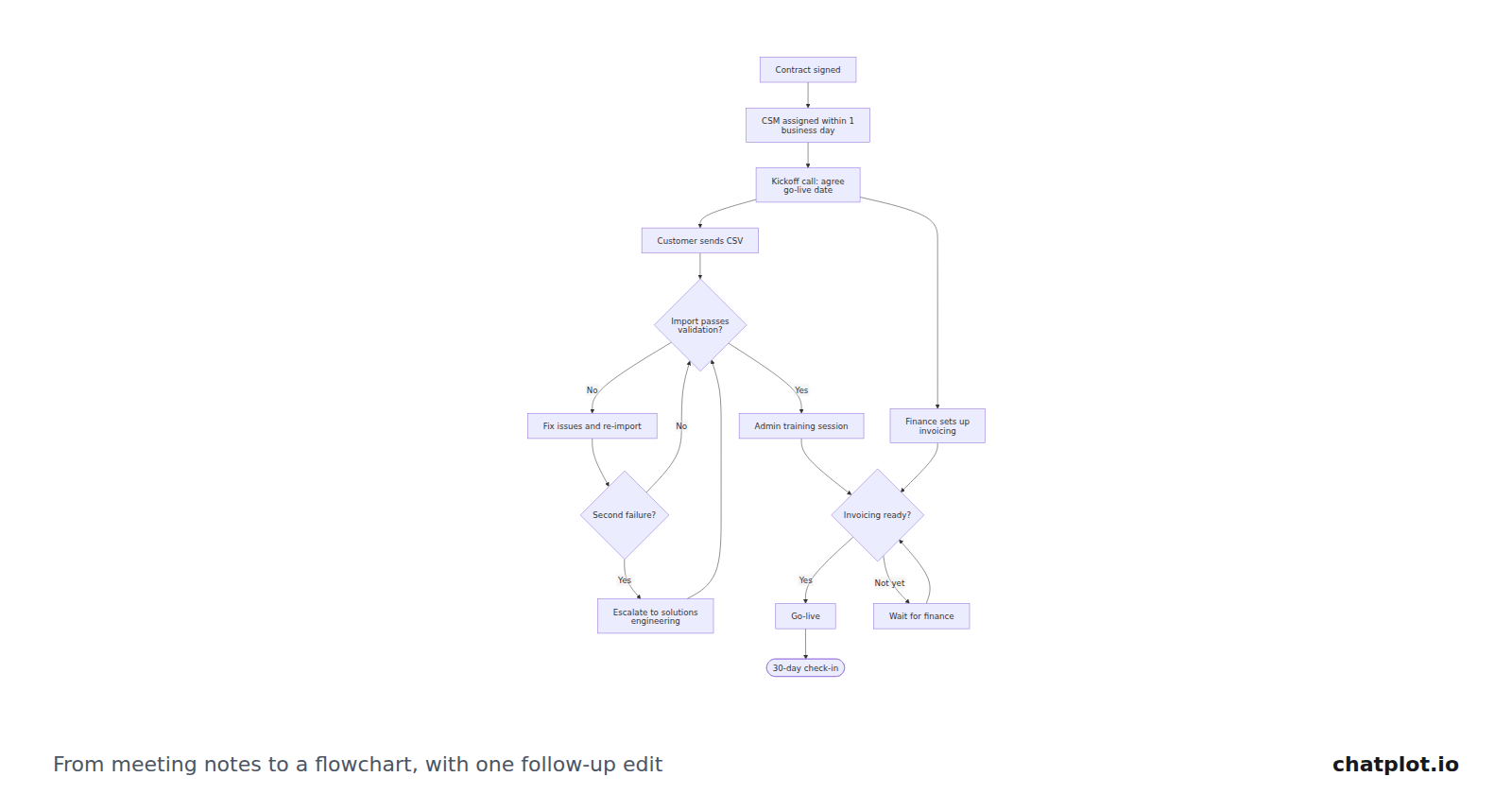
Most meeting notes are already half a diagram. A list of steps with two or three "if this happens, do that" lines buried in it is a process, written in the order people happened to say it. This guide runs one real set of notes through ChatPlot without tidying them up, then shows what came back, what the tool worked out, what it guessed, and what to check before the picture goes near a customer.
Start with the notes exactly as they are
No rewriting, no cleaning up. This was the entire input:
Notes from Tuesday's ops meeting:
- new customer signs contract → CSM assigned within 1 business day
- kickoff call, agree on go-live date
- data import (customer sends CSV, we validate, fix issues, re-import)
- training session for admins
- go-live, then 30-day check-in
- if the import fails validation twice, escalate to solutions engineering
Six bullets. The third one hides four separate things inside a parenthesis. The last one is not a step at all: it is a rule, written down after the fact, about something that happens in the middle of the process.
The first draft
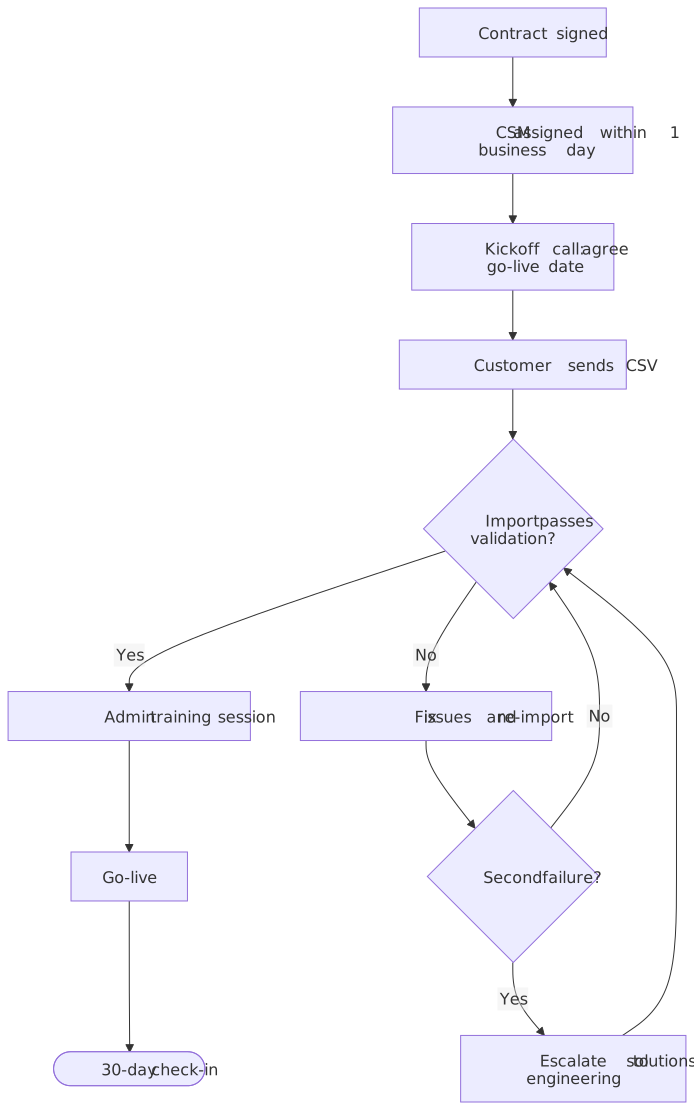
Six bullets became eleven elements: nine steps and two decisions. That was one request, which counts as one AI action.
What the tool worked out
Plain bullets became plain steps. Contract signed, CSM assigned, kickoff call, admin training, go-live: each of those is a box in the order the notes gave them.
"We validate" became a decision. Validation has two outcomes, so it is drawn as a diamond, "Import passes validation?", rather than a step. "Yes" continues to admin training; "No" goes to "Fix issues and re-import", which loops back for another check. The parenthesis in bullet three became three connected elements and a loop.
The rule about two failures became its own decision. A count cannot live on an arrow, so "if the import fails validation twice" is drawn as a second diamond, "Second failure?", sitting on the failure path after the fix-and-re-import step. "No" goes back to validation; "Yes" escalates to solutions engineering.
Detail stayed in the labels. "CSM assigned within 1 business day" kept its deadline instead of being simplified to "assign CSM". Small commitments are usually the part people argue about later, so it is worth keeping them visible.
The last bullet became the end. The 30-day check-in is drawn with the rounded end shape, which is a claim about your process: the check-in closes onboarding, and nothing follows it.
What it guessed
What happens after an escalation. The notes never say. The diagram sends the escalation back into validation, which is a reasonable reading, but it is a guess, and it is exactly the kind of guess an ops lead will spot in two seconds.
The position of training. Admin training sits before go-live because the bullets were in that order, not because anyone said it was a prerequisite.
"Agree on go-live date" is inside the kickoff box rather than being a step of its own.
Nobody owns anything. "We validate" never gets a name. The diagram says what happens, not who does it.
When a request can be read more than one way, ChatPlot picks the most reasonable reading and states which one it picked in its reply. Read the reply, not only the picture.
One follow-up request
Nothing in the notes mentioned billing, because everyone in the room already knew about it. Adding it took one sentence:
Add the billing setup: after the kickoff call, finance sets up invoicing in parallel with the data import, and go-live cannot happen until both are done.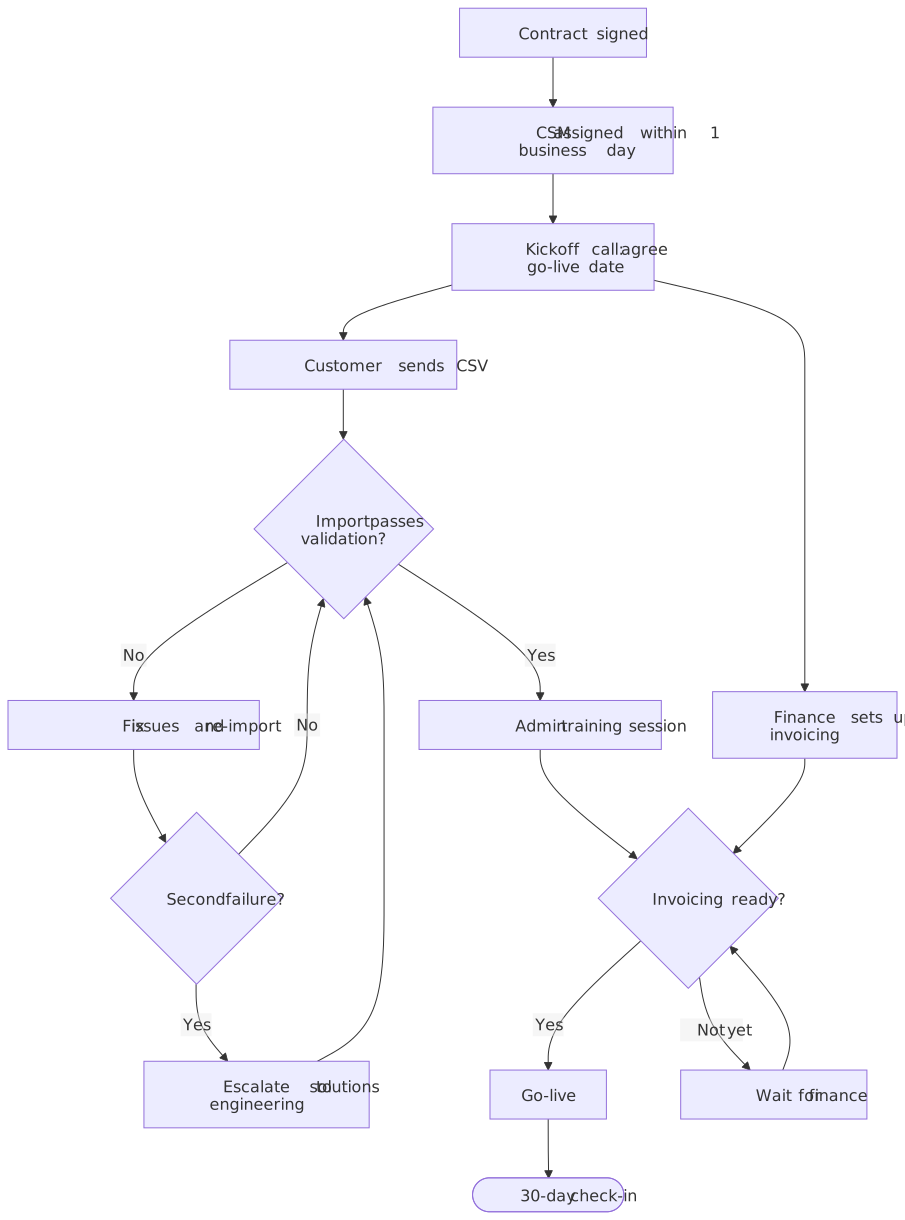
Three things changed. The kickoff call now has a second arrow out of it, to "Finance sets up invoicing", so the two tracks run side by side. They meet at a new decision just before the end, "Invoicing ready?", with a "Wait for finance" loop for when it is not. That is how a flowchart says "both must be done first". Everything else is untouched: same labels, same validation loop, same escalation. An edit changes what you asked about and leaves the rest alone, and the first version stays in history to compare or restore.
What to check before you share it
Labels. Do they use your team's words? "CSM assigned within 1 business day" is your note's phrasing; if your SLA is actually one calendar day, the diagram is now wrong in a way that looks authoritative.
Missing paths. Walk both exits of every decision and ask where a reader would get stuck. This diagram has no path for a customer who never sends the CSV, and no path for a canceled onboarding.
Ownership. If a step could be done by two different teams, put the owner in the label or ask for the steps to be grouped by team. Ambiguity about who acts is the most common reason a process diagram gets ignored.
Export it or share the link
Export PNG for slides and documents, SVG when the diagram has to scale or be printed large. A share link carries the diagram inside the link, so whoever opens it sees the same picture without an account. Guest and free-account exports carry a small chatplot.io mark; Pro removes it and exports PNG at up to 3× resolution. Exports, share links, direction and theme changes never use AI actions.
The workflow, in five steps
- Paste the notes as they are, and ask for a flowchart.
- Read the reply alongside the diagram: it says what was assumed.
- Correct the biggest wrong thing in one sentence, not five.
- Check labels, both exits of every decision, and ownership.
- Export or share, then keep the thread. The next meeting's changes are one more sentence.
Limits worth knowing
Layout is automatic. You choose the direction and ask for grouping; you cannot drag a box to a specific position.
Long labels get cramped. Keep each step to a short phrase and put the detail in the conversation.
One process per diagram. Past roughly 40 steps a flowchart stops fitting on a screen. Split it into a top-level flow plus one diagram per phase.
AI actions are metered. Creating or editing a diagram uses one action; guests get 5 per session, a free account gets 10 per calendar month, Pro gets 500. Failed requests are not charged, and templates, history, undo, compare, restore, exports and share links never use an action.
Try it with a set of notes you already have, or start from the user onboarding template and change it to match your process.