
Flowchart vs sequence diagram: the same checkout drawn both ways
One checkout process, drawn as a flowchart and as a sequence diagram, with what each format makes obvious, what it hides, and how to pick between them.
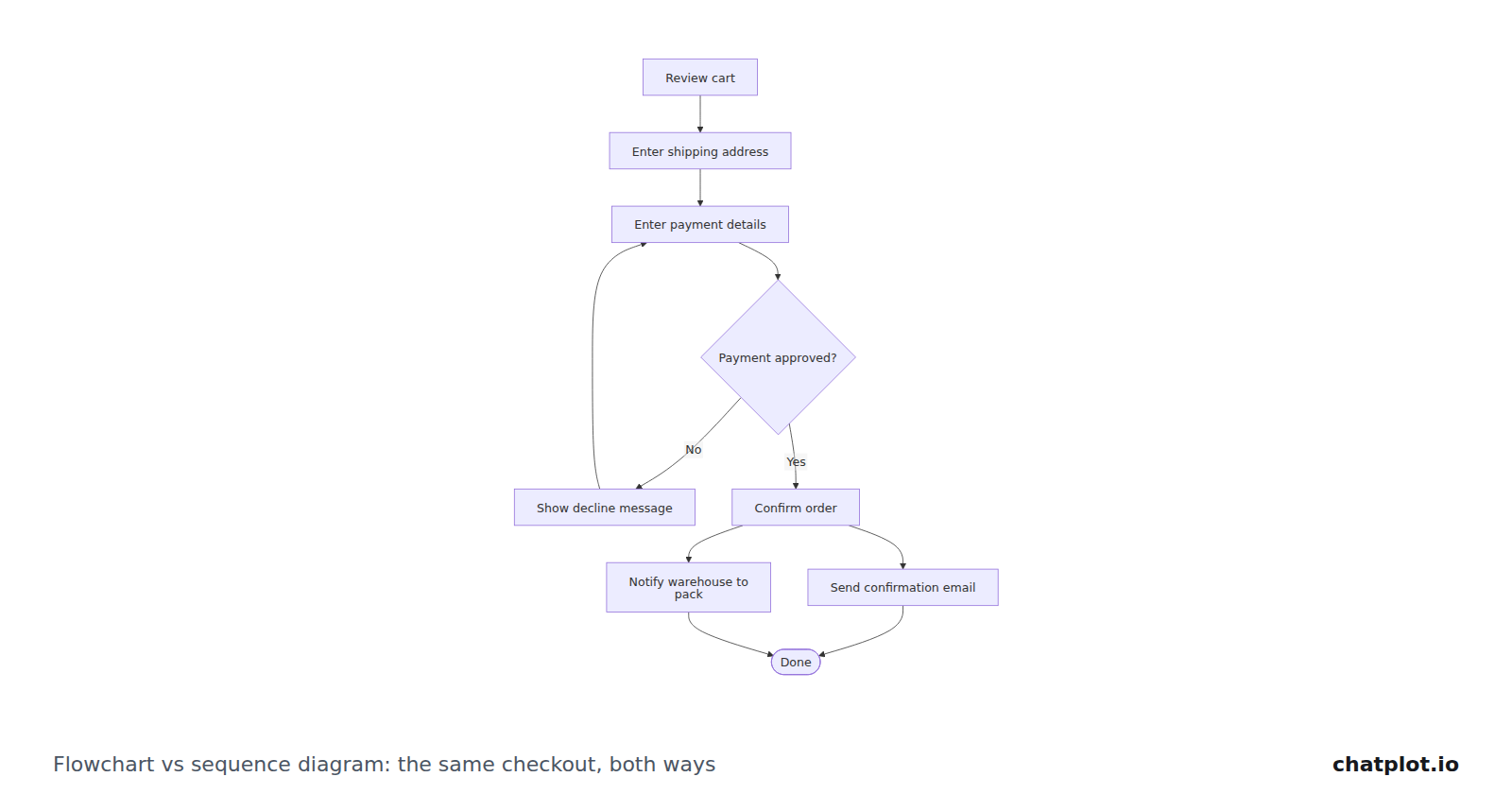
A flowchart shows the path a process takes: steps in order, decisions, and where each branch leads. A sequence diagram shows an exchange between named participants: who sends what to whom, in what order, and what comes back. One question decides which you need: if you are answering "what happens next?", draw a flowchart; if you are answering "who sends what to whom?", draw a sequence diagram.
Below is the same online checkout drawn both ways, from two descriptions of the same process.
The same checkout as a flowchart
The checkout process for an online shop: the customer reviews the cart, enters a shipping address, pays, the payment provider approves or declines, and on approval the order is confirmed and the warehouse is told to pack it.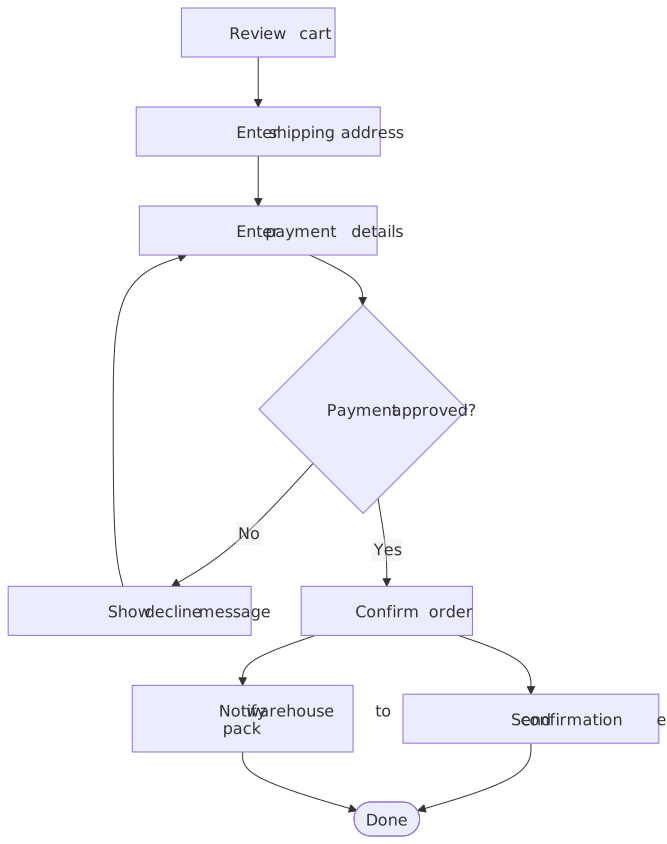
What this version makes obvious:
- The order of the customer's steps, from cart to done, as one path you can trace with a finger.
- Where the loop is. A decline sends the customer back to the payment details, not back to the cart or the address. That is a product decision, and here it is visible.
- That one decision governs everything. "Payment approved?" has exactly two exits, and both go somewhere.
- That two things happen after confirmation. The confirmation email and the warehouse notification both branch off "Confirm order" and both have to land before "Done".
What it hides:
- Who does the work. "Payment approved?" is drawn as a decision the process makes. Nothing says the payment provider decides it, that the shop's own server asked, or that the warehouse is a separate system.
- Which system failed. A decline is an outcome, not an answer from a named party, so the diagram cannot tell you whether the shop rejected the card or the provider did.
- Timing. Whether the email goes out before or after the warehouse hears about the order is not stated, and cannot be.
The same checkout as a sequence diagram
A sequence diagram of the same checkout: the shopper submits payment, the shop server asks the payment provider to charge the card, the provider answers approved or declined, and on approval the server confirms the order, emails the shopper and queues the order for the warehouse.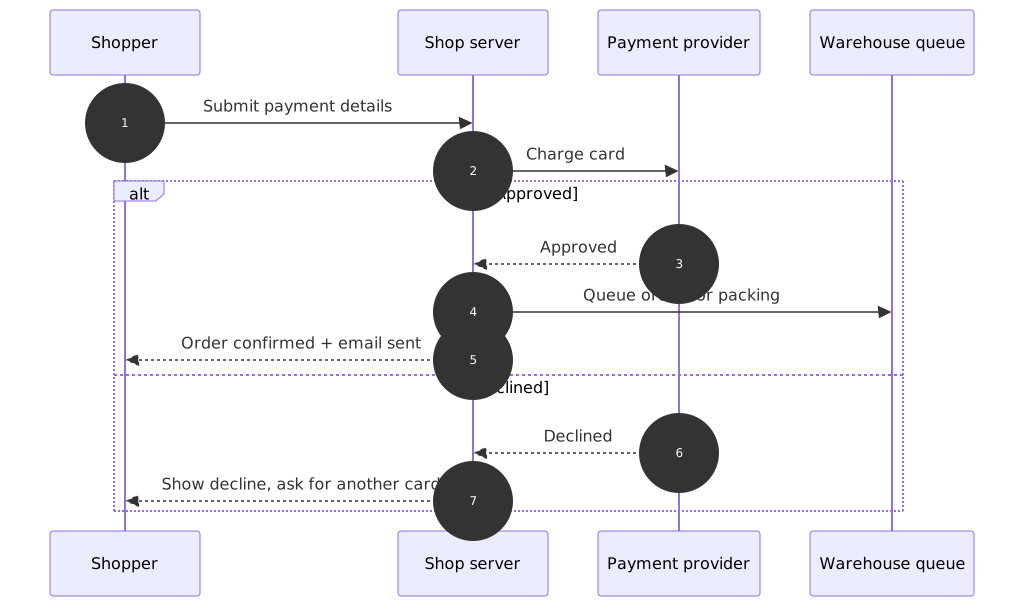
What this version makes obvious:
- Four participants, named. Shopper, shop server, payment provider, warehouse queue. The boundaries between systems are the diagram.
- Request and response as a pair. "Charge card" goes out, "Approved" or "Declined" comes back. You can point at one message and ask what happens if it never arrives.
- Who never talks to whom. The shopper never reaches the warehouse queue; everything goes through the shop server.
- The order of the last three messages on the approved path, which the flowchart could not express.
What it hides, and where it gets awkward:
- Decisions are clumsy. The approve/decline split needs an alternative block wrapping both outcomes. Two or three nested conditions and the diagram becomes hard to read.
- There is no loop over many steps. "Go back and try a different card" is written as a message, not drawn as a path returning to an earlier point.
- The customer's own journey disappears. Reviewing the cart and entering an address are not exchanges between systems, so this version starts at "Submit payment details".
Side by side
| Flowchart | Sequence diagram | |
|---|---|---|
| Answers the question | What happens next? | Who sends what to whom? |
| Main elements | Steps, decisions, branches, loops, start and end | Participants, messages, replies, alternatives, notes |
| Best for | Processes, policies, decision rules, anything with branches | Interactions between systems, services or roles |
| Gets awkward when | Several actors hand work back and forth | The process has many decisions and few actors |
| Typical readers | Anyone who has to follow the process | People building or reviewing an integration |
Choosing in practice
Writing down an approval policy. Flowchart. The interesting parts are the thresholds, who says yes, and what happens when a request comes back with comments.
Reviewing an API integration with another team. Sequence diagram. You want the message names on the page so the two teams can disagree about a specific one.
Reconstructing an incident. Sequence diagram, if you are showing what each system and person sent and in what order. The runbook for handling the next incident is a separate flowchart.
Designing onboarding. Flowchart for the flow itself: screens, skips, drop-off points. If what you actually want is the stages a person goes through and how each one feels, that is a user journey, not either of these.
Describing the data behind checkout. Neither. Orders, customers, payments and their relationships belong in an ER diagram.
Draw both in ChatPlot
Paste either description above and you get the diagram shown here; nothing was drawn by hand. To get the other format, you do not start again. Ask in the same thread:
Redraw this as a sequence diagram between the shopper, the shop server and the payment provider.Each request that returns a diagram is one AI action, so drawing a process both ways costs two. The first version stays in history, where you can compare the two or restore it.
If you would rather start from something finished, the approval process flowchart template and the API authentication sequence diagram both open as editable diagrams and use no AI action.
Common mistakes
- Using a sequence diagram for a process with more decisions than actors. If you are stacking alternative blocks, you wanted a flowchart.
- Hiding a handoff inside a flowchart label. "Payment provider checks card" as a single box looks fine until the review is actually about that exchange. Redraw it.
- Trying to answer both questions in one diagram. Adding participants to a flowchart, or decisions to a sequence diagram, usually ends with a picture that answers neither. Draw two.
- Leaving a branch or a reply unnamed. A decision with one exit, or a request with no answer drawn, is where readers stop trusting the diagram.
Questions people ask
Can one diagram show both the steps and the participants?
Partly. A flowchart can be grouped into lanes by team, which shows ownership but still does not show messages. When the exchange itself is the subject, a sequence diagram is the honest choice.
Are sequence diagrams only for software?
No. Participants can be people, teams or departments. A purchase request moving between a requester, a manager and finance reads perfectly well as a sequence diagram. Software is just where the format is used most.
Which one works better for readers outside the team?
Usually the flowchart. Most people can follow steps and decisions without being taught the format, whereas lifelines and message arrows need a sentence of explanation first.