Prompt-first diagramming for product teams
A workflow for product teams: write the flow in plain language, read the diagram back, then change it by asking. Includes a real prompt and the edits that follow.
Most product thinking does not get stuck on ideas. It gets stuck between having a rough idea of a flow and having something the team can look at and argue with.
Traditional diagram tools ask you to commit early: pick a shape, place it, connect it, align it. You are making layout decisions before you know whether the structure is right, and once the boxes are placed, changing your mind costs real work. So people leave the flow in a bulleted list, and the list quietly becomes the spec.
Prompt-first diagramming inverts the order. You write the flow in sentences, read the diagram back, and then argue with the picture instead of the prose.
The workflow
- Write the structure in plain language, in whatever order it comes out.
- Read the diagram it produces and look for what is wrong, missing or out of sequence.
- Ask for the change in words. The diagram is redrawn around it.
- Repeat until the picture matches what the team actually means, then share or export it.
The value is not that a machine drew it. The value is that step 2 happens early, on a real picture, while the structure is still cheap to change.
A worked example: user onboarding
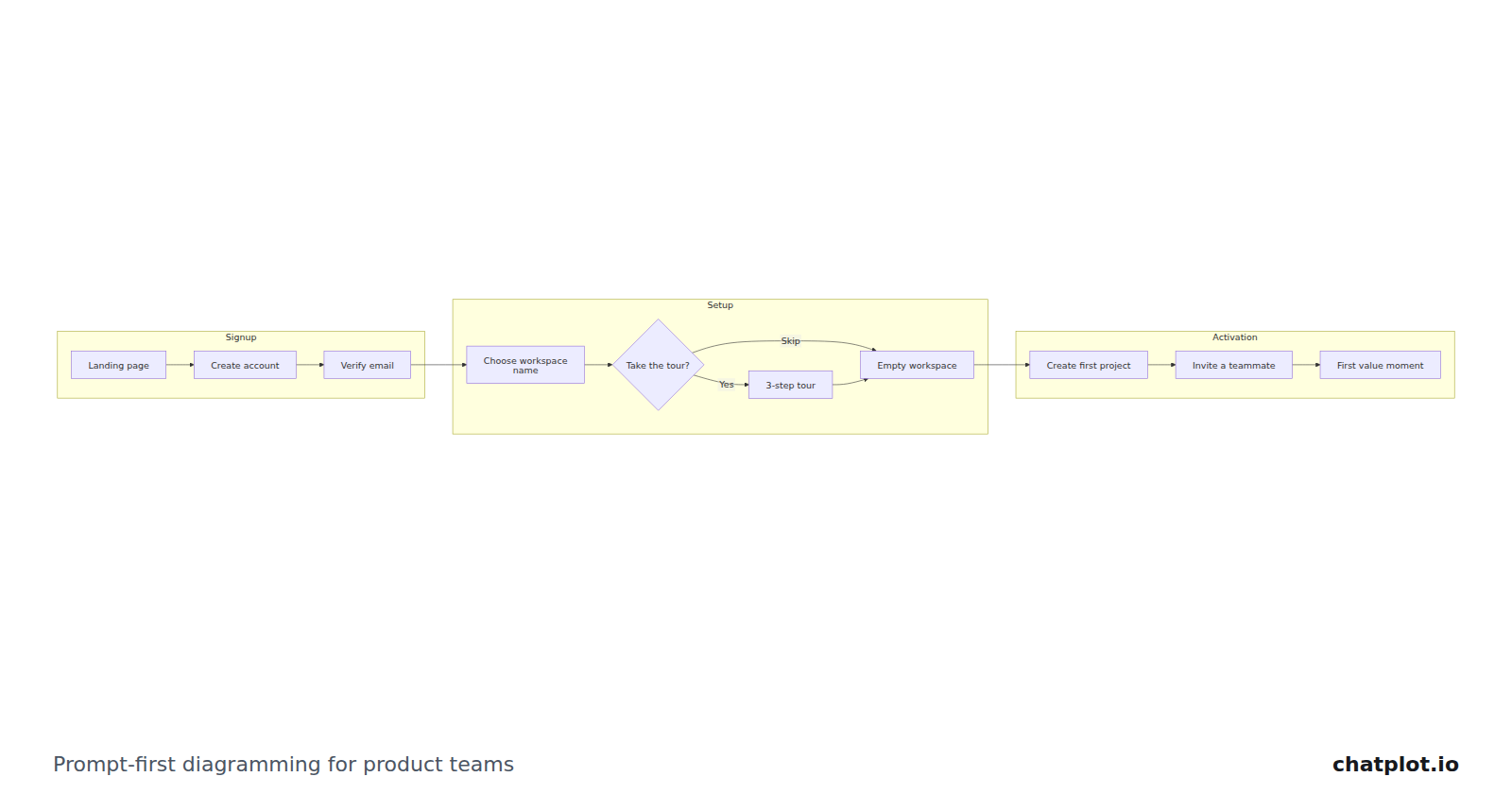
Here is the diagram produced from one description of a signup-to-first-value flow.

This is the prompt that made it:
Draw a user onboarding flow in three phases: Signup, Setup and Activation. Signup: landing page, create account, verify email. Setup: choose a workspace name, then ask whether to take the tour, where yes goes through a 3-step tour and skip goes straight on. Activation: empty first project, invite a teammate, first value moment.Note what is not in the prompt: no coordinates, no shapes, no colors, no decision about where the branch should rejoin. Layout is automatic. What you control directly is the direction and the theme, and everything else you ask for in words.
What changes when you ask for edits
The second half of the workflow is where the time goes on a hand-built canvas, so it is worth being concrete about it. Four typical review comments, and what each one does to the diagram above:
- "Add a Google sign-in path from the landing page that skips email verification and rejoins at the workspace name." A second branch appears out of the first step and merges back in; everything downstream shifts to make room, and no arrow is rerouted by hand.
- "Rename 'first value moment' to 'first report shared'." One node is relabeled, and the box resizes with the longer text.
- "Add an exit after 'verify email' for people who never confirm." A new end state is attached to the verification step, and the phase grouping still holds.
- "Make it top to bottom." The same diagram, redrawn vertically. Direction and theme changes do not cost an AI action.
Each of those is one sentence in the chat, and each version is kept, so you can compare a review's worth of changes against the draft you walked in with, or restore the earlier one if the room disagrees.
Where this pays off for a product team
Early planning. A flow written in a doc gets read three different ways by three people. The same flow as a picture gets one of those readings corrected in the meeting rather than after it.
Review rounds. Comments in a review are already phrased as sentences. Prompt-first diagramming lets them be applied as sentences, rather than translated into box-moving after the meeting.
Handoff. The diagram goes into a ticket or a spec as a PNG or SVG, or as a share link that carries the diagram inside the link, so whoever opens it does not need an account.
Where it does not help
If the artifact is a picture rather than a structure, describing it is the long way round. A rough interface sketch, a system drawing with an exact layout someone already agreed, a diagram that must match a company shape set: draw those, in a tool built for drawing. Prompt-first works when the content has structure you can state in a sentence, and when you expect that structure to change a few more times before it is finished.
Start from the middle
The blank prompt is its own small hurdle. The user onboarding flow template opens the diagram above, ready to change with the same kind of one-line request, and the AI flowchart generator starts from a description if your flow is nothing like this one. Either way, the first thing to do with the result is find what is wrong with it.