
API authentication sequence diagram
Authentication is the integration most teams get subtly wrong because the order of exchanges is hard to keep in your head. This sequence diagram shows a sign-in through an identity provider from the click to the refreshed access token, with the actors named so you can point at a message and ask "what if this fails?".
Opens instantly as a new diagram in the workspace, without using an AI action and without touching your existing diagrams. No account needed.
Published
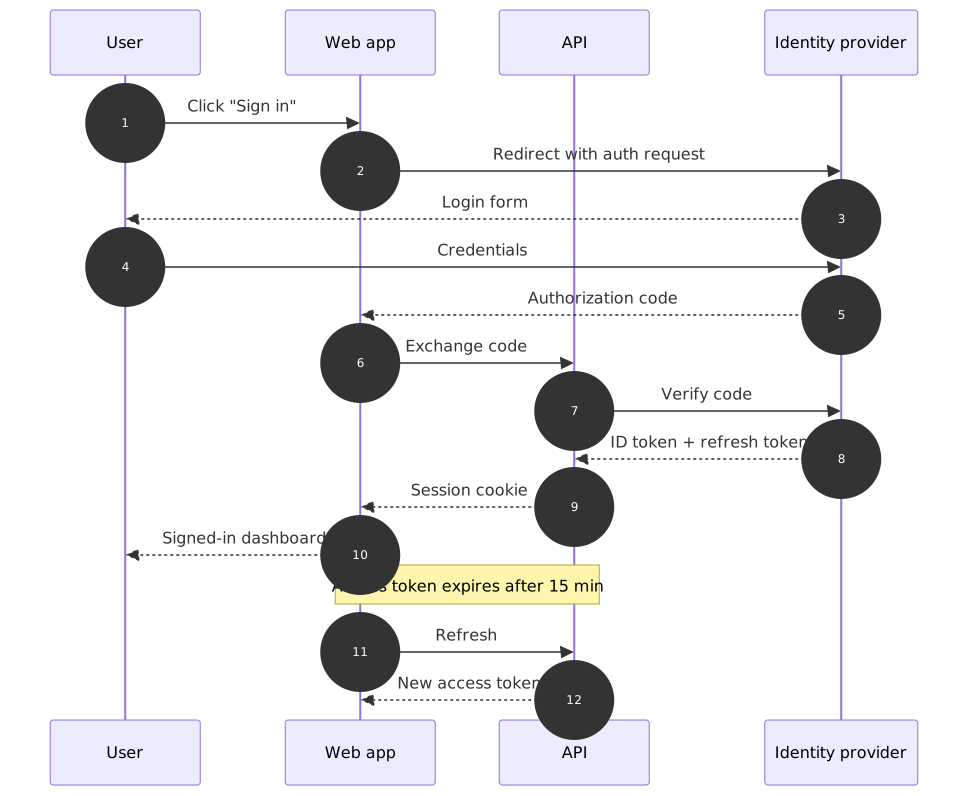
What is in the template
- Four participants
- User, Web app, API and Identity provider: the minimum set that shows where credentials go and where they never go.
- Redirect and authorization code
- The web app never sees the password: the identity provider shows the login form and returns an authorization code.
- Code exchange and verification
- The API exchanges the code with the identity provider and receives the ID token plus a refresh token.
- Session cookie → dashboard
- The browser gets a session cookie, not the tokens; the note records the 15-minute access-token expiry.
- Refresh
- The final two messages show the silent refresh, the part that is usually missing from hand-drawn versions.
The description that made it
Template prompt
A sequence diagram for logging in with an identity provider, refreshing an access token, and handling an expired refresh token.
Templates are stored as finished diagrams, so opening one never calls the AI. The prompt above is what you would type to get a similar result from scratch.
Good for
API design reviews, onboarding backend engineers, security reviews, documenting an integration for a partner.
Ways to make it yours
Open the template, then type any of these into the chat. Each one is a single AI action and produces a new version you can undo.
- "Show what happens when the refresh token has expired: the user is sent back to the login form."
- "Add a multi-factor step between credentials and the authorization code."
- "Replace the identity provider with our own auth service and remove the redirect."
- "Add a mobile app as a second client that uses the same API."
- "Add a note that tokens are stored in an HTTP-only cookie."
Direction (top-to-bottom or left-to-right), theme, export and share links never use actions.
What it costs to keep going
- Guest: 5 AI actions to try it, up to 3 diagrams saved in this browser, PNG and SVG export with a small chatplot.io mark.
- Free account (Google sign-in): 10 AI actions every month, unlimited diagrams synced to your account, exports with the mark.
- Pro: $15 per month or $144 per year, 500 AI actions a month, exports without the mark, PNG up to 3× resolution.
One AI action = one create or edit request that produces a diagram. Failed requests are not charged; templates, history, direction and theme changes, exports and share links never use actions. Team and Enterprise plans are not available. Full pricing.

Guides that go deeper
Questions before you start
Is this OAuth 2.0 or OpenID Connect?
Can I export the diagram code for our docs?
Open the api login sequence template
It loads in a second. Rename the steps, add your own, export a PNG for the doc.