Incident response flowchart template
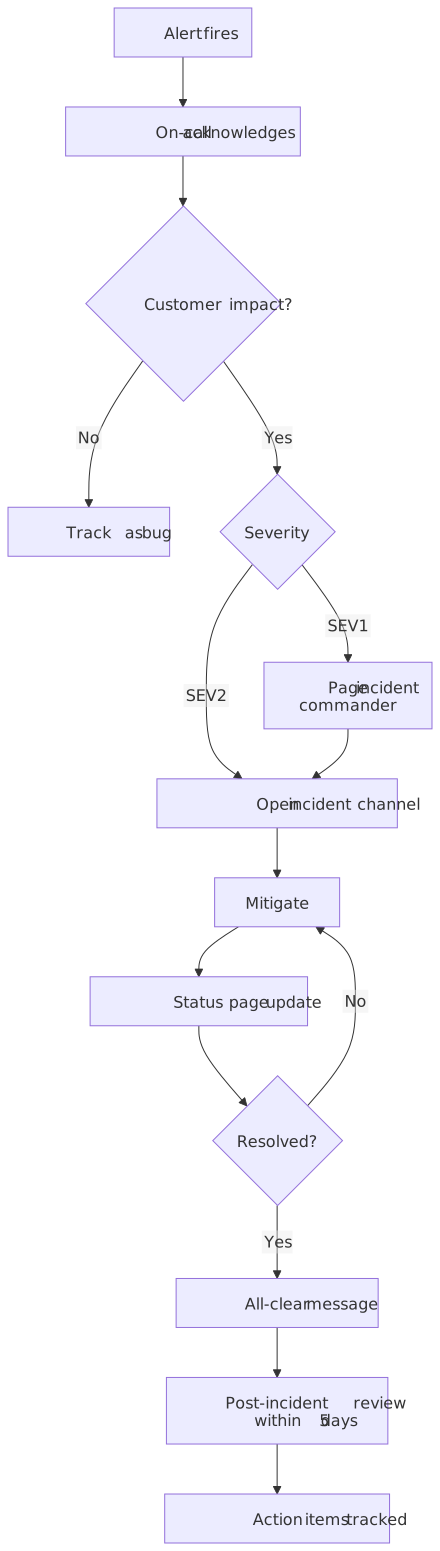
During an incident nobody reads a long runbook. A one-screen flowchart of who does what (acknowledge, decide if customers are affected, pick a severity, mitigate, communicate, review) is what people actually follow. This template is that flowchart, ready to adapt to your roles and severities.
Opens instantly as a new diagram in the workspace, without using an AI action and without touching your existing diagrams. No account needed.
Published
What is in the template
- Alert fires → On-call acknowledges
- The first two boxes are the two things that must always happen, whatever the severity.
- Customer impact?
- No impact means the alert becomes a tracked bug and leaves the incident path early.
- Severity triage
- SEV1 pages the incident commander before the channel opens; SEV2 opens the incident channel directly. Add your own levels.
- Mitigate ↔ Resolved? loop
- Mitigation and status-page updates repeat until the incident is resolved; the loop is drawn explicitly.
- All-clear → Post-incident review within 5 days → Action items tracked
- The review has a deadline in the label so it does not quietly drop off.
The description that made it
Template prompt
An incident response runbook with severity triage, on-call escalation, customer communication and a post-incident review.
Templates are stored as finished diagrams, so opening one never calls the AI. The prompt above is what you would type to get a similar result from scratch.
Good for
On-call runbooks, SRE onboarding, tabletop exercises, compliance evidence that a process exists.
Ways to make it yours
Open the template, then type any of these into the chat. Each one is a single AI action and produces a new version you can undo.
- "Add a SEV3 level that only creates a ticket."
- "Add a communications lead who owns the status page updates."
- "Insert a security check: if data may be exposed, notify the security team before mitigation."
- "Add a rollback decision before mitigation."
- "Change the review deadline to 3 business days."
Direction (top-to-bottom or left-to-right), theme, export and share links never use actions.
What it costs to keep going
- Guest: 5 AI actions to try it, up to 3 diagrams saved in this browser, PNG and SVG export with a small chatplot.io mark.
- Free account (Google sign-in): 10 AI actions every month, unlimited diagrams synced to your account, exports with the mark.
- Pro: $15 per month or $144 per year, 500 AI actions a month, exports without the mark, PNG up to 3× resolution.
One AI action = one create or edit request that produces a diagram. Failed requests are not charged; templates, history, direction and theme changes, exports and share links never use actions. Team and Enterprise plans are not available. Full pricing.

Guides that go deeper
Questions before you start
Can I show a timeline of a specific incident instead?
Can my team edit the same diagram?
Open the incident response template
It loads in a second. Rename the steps, add your own, export a PNG for the doc.